Frequently Asked Questions:
- Windows Operating System (Windows XP/Vista/7/8/10) has blocked access to the vPTS/vDTS/vATS installation file because it says it is potentially harmful. What should I do?
- When I run vDTS/vPTS, I get this message dialog, where do I get the missing DLL?
- Does vDTS work on Windows Vista or Windows 7/8/10 machines?
- The buttons at the bottem of vATS/vDTS/vPTS are not visible, what should I do?
- How to find out which version of NVIDIA GPU driver I have?
- My computer has an Intel i5/i7 CPU but Intel QuickSync Acceleration (Decoding/Encoding) is not enabled, why?
- When I open vMTS, the settings (stamp location, font, etc) I used previously are used. But sometimes the previous settings are gone. Why?
- When I play the stamped video using VLC video player, there is no audio. What happened?
Frequently Asked Questions for vHTS:
Frequently Asked Questions for vMTS:
- Does vMTS support HEVC/H265 encoded videos?
- I have a MOV file. It looks fine on the preview screen but the stamped video is scrambled and unwatchable. Why?
- In the stamped video, I saw date stamp, but not time stamp even though I enabled both date and time stamp. What happened?
- In the stamped video, I saw date/time being Jan 1, 1970. Why?
Frequently Asked Questions for vATS:
- Does vATS work on Windows XP or Vista?
- Of what format is the vATS stamped output files?
- What software to use to view the vATS stamped output files?
- I get this message "'file_name' is not AVCHD format video file" when I try to stamp a video file (named 'file_name'), what should I do?
Frequently Asked Questions for vDTS:
- Does vDTS work on any AVI files?
- Does vDTS work on MPEG-I/MPEG-II format files?
- How does DV Time Stamp fit in the process of making DVD from DV camcorder tapes?
- vDTS finished stamping my file, but I did not see time stamp in the stamped file. What happened?
- Can vDTS stamp large size files?
- Will vDTS change the quality of my video?
- When I play back the stamped video using Microsoft Media Player, why the stamps look flickering?
- Do you recommend any DV capture software?
Frequently Asked Questions for vPTS:
- When I print the stamped photo, the date/time is gone. What happened?
- What is EXIF format?
- When I tried to preview a image, I saw a message 'File xxx does not contain valid time code', what does it mean?
- Does vPTS work on TIF files?
- Will vPTS change the quality of my photo?
- When I run vPTS, I got the "side-by-side config incorrect" error, why?
- Save the file onto your computer.
- Click Start, click My Computer, and navigate to the file that you saved.
- Right-click the file that you saved, and then click Properties.
- Click Unblock near the bottom of the dialog box.
- mfc70u.dll
- msvcr70.dll
- GdiPlus.dll Note: download the missing DLL, and put it in your computer's system directory. Typically for 64bit version Windows 7/8/10, the system directory is C:\Windows\sysWOW64. For 32bit version Windows (XP/Vista/78/10) the system directory is C:\Windows\system32.
- On the desktop background, right click for the pop-up menu, then select NVIDIA Control Panel
- Select Help from menu bar, then select System Information
- The driver version is shown in the Details panel
- Transfer the video from your camcorder to PC via firewire/USB2. Results: DV AVI files on your PC.
- Use vDTS to stamp your DV AVI files. Results: time stamped DV AVI files, your original DV AVI files are not altered.
- Edit the time stamped DV AVI files using your favorite video editing software (cutting/joining, adding title, transition effects, etc). Results: edited DV AVI files.
- Encode the edited DV AVI files into DVD (MPEG-II) format using your favorite video encoding software. Results: DVD (MPEG-II) format video files.
- Author and burn the DVD format files into DVD disc.
- Enjoy and share your memory on DVD with your family and friends.
Windows Operating System (Windows XP/Vista/7/8/10) has blocked access to the vPTS/vDTS/vATS v*ts-setup.zip file because it says it is potentially harmful. What should I do?
You have to first save the zip file onto the computer then navigate to it via My Computer. Right Click on it and go to properties and click on "Unblock". Then it will extract all the files.
Below is a copy of the Windows documentation on it:
How blocking some attachments helps protect your computer
Sending and reading e-mail is one of the most popular activities on the Internet. The widespread use of this technology, however, makes it a primary way for computer viruses to spread. Because viruses and other security threats are often contained in e-mail attachments, Microsoft Windows XP Service Pack 2 (SP2) helps protect your computer by blocking e-mail attachments that might be harmful.
In most cases, Windows XP SP2 will block files that have the potential to harm your computer if they come to you through e-mail or other communication programs. Windows will block these files if your program is running in a strong security mode. Most files that contain script or code that could run without your permission will be blocked. Some common examples of this file type are those with file names that end in .exe, .bat, and .js.
Blocking these files is very important to do, since directly opening files of this type poses a risk to your computer and personal data. If you are certain that you trust this file and want to open it, follow the instructions below.
When I run vDTS/vPTS, I get this message dialog, where do I get the missing DLL?

You may download the missing DLLs using the following links:
Does vDTS/vPTS work on Windows Vista or Windows 7/8/10 machines?
Yes. For 32 bit Windows Vista/7/8/10, put the DLLs (mfc70u.dll msvcr70.dll GdiPlus.dll) in c:\Windows\system32 folder; For 64 bit Windows Vista/7/8/10, put the DLLs (mfc70u.dll msvcr70.dll GdiPlus.dll) in c:\Windows\sysWOW64 folder.
The buttons at the bottem of vATS/vDTS/vPTS are not visible, what should I do?
The minimum screen resolution required to run vATS/vDTS/vPTS is 1024x768. At this minimum resolution, the DPI (dot per inch) of the display screen must be less than or equal to 100. If your DPI setting is larger than 100 you need to adjust it to a lower value.
How to find out which version of NVIDIA GPU driver I have?
This only applies to computers that have NVIDIA GPU.
You may download the latest NVIDIA GPU driver at here
Older NVIDIA GPU may not work. If that happens, disable GPU Decode/Encode Acceleration, use the software Decode/Encode instead.
My computer has an Intel i5/i7 CPU but Intel QuickSync Acceleration (Decoding/Encoding) is not enabled, why?
The QuickSync HD graphics is part of the Intel i5/i7 CPU. It is so called integrated video processor. If your computer has a separate video card, it prevents the i5/i7's integrated video processor from being used. Consequently QuickSync Acceleration (Decoding/Encoding) cannot be used.
If you want to use the integrated video processor, you need to physically remove the separate video card. This will force the computer to use the i5/i7's integrated video processor, thus allow QuickSync Acceleration (Decoding/Encoding).
When I open vMTS, the settings (stamp location, font, etc) I used previously are used. But sometimes the previous settings are gone. Why?
If you do not explicitly save your settings to a project file (*.vmts), vMTS saves your lastest settings to a temporary file called
C:\Users\"your user name"\AppData\Local\Temp\vMTS.cfg, where "your user name" is your Windows login name. Since this is in a temporary folder, it could be deleted if you do any kind of
file cleanup.
If you want to preserve your settings, you should save to a named project file (*.vmts) using menu Project->Save or Save as. Then
Project->Open next time you want to use the saved settings. Please read Help for more info about project files.
When I play the stamped video using VLC video player, there is no audio. What happened?
It might be a player problem. Try to play the stamped video using Windows Media Player or PotPlayer (https://potplayer.daum.net/). The PotPlayer is a free, very powerful video player.
How do I transfer HEVC videos from iPhone to PC?
HEVC video recording is used in the newer iPhones, to import such videos to PC, set the iPhone like this: Settings->Photos->Transfer to PC: select ‘Keep Originals’. With this setting, videos are imported as *.MOV files with HEVC format.
On the other hand, if you would like to use MPEG4 format to store videos on your PC, you may set the iPhone like this: Settings->Photos->Transfer to PC: select ‘Automatic’. With this setting, videos are imported as *.MOV files with MPEG4 format.
In either case, you may use the Photos program in Windows 10 to import the videos from iPhone to PC. For the same video, the file size imported with HEVC format is much smaller than that with MPEG4 format, since HEVC video is encoded more efficiently.
Does vMTS support HEVC/H265 encoded videos?
No, vMTS does not support HEVC/H265 encoded videos. HEVC/H265 is a new video encoding technology. vMTS supports MP4 and/or MOV videos that are encoded in AVC/H264 technology. You may use our product vHTS to time stamp HEVC videos.
I have a MOV file. It looks fine on the preview screen but the stamped video is scrambled and unwatchable. Why?
Looks like the problem is with the resolution of the original video: the Intel QuickSync Accelerated Encoding (which vMTS uses when selected) cannot handle video width that is not a multiple of 32. So for a video of resulution 568x320, since 568 is not a multiple of 32, the video would not be stamped properly.
If your video recorder allows, try to change the recording resolution to meet this requirement.
To time stamp such video, do not select Intel QuickSync Accelerated Encoding option in the Preferences Dialog.
On iPhones, videos are recorded as HD with resolution of 1920x1080. But if you email the videos to your computer, iPhone automatically reduces the resolution to 568x320. You should use other means to transfer the HD videos to your computer, e.g. by connecting your iPhone directly to your computer and copy the video files.
In the stamped video, I saw date stamp, but not time stamp even though I enabled both date and time stamp. What happened?
It is likely that the time stamp had been placed outside of the video frame. Try to adjust (reduce) the (x, y) coordinate value of the time stamp. You should be able to see the time stamp in the preview window.
In the stamped video, I saw date/time being Jan 1, 1970. Why?
When videos are recorded by a video camera, the camera embeds the date/time code in the video. That is why vMTS can time stamp the video: vMTS extracts the embedded date/time code, translates the code to the date/time string, and adds the string to the visible video frames.
If a video does not have date/time code, the video typically contains date/time code 0. In MOV/MP4 videos, the code 0 represents the base reference time, which is Jan 1, 1970. That is why if a video does not contain valid code, it is usually stamped as Jan 1, 1970.
Video camera recorded videos usually contain valid date/time code. Videos converted from other format usually do not contain valid date/time code
Does vATS work on Windows XP or Vista?
NO. vATS works on Windows 7/8/10.
Of what format is the vATS stamped output files?
vATS stamped output files use Windows Media file format (*.wmv) or AVCHD Compatible file format (*.mts).
For the wmv format, the video portion is encoded in H264, and the audio portion is in AAC. If the Audio option "Do not transcode audio" is selected, then the audio portion is in AC3, which is the native audio format used in AVCHD.
For the mts format, the video portion is encoded in H264, and the audio point is in AC3, the native audio format used in AVCHD.
What software to use to view the vATS stamped output files?
vATS stamped output files can be viewed in Windows Media Player (WMP) that comes with Windows 7/8/10, and edited by Windows Live Movie Maker 2011. The AVCHD compatible format may also be edited by other video editing software.
You may download Windows Live Movie Maker 2011 for free.
I get this message "'file_name' is not AVCHD format video file" when I try to stamp a video file (named 'file_name'), what should I do?
Most likely the video file is somehow corrupted, or does not have correct AVCHD format.
There is a work around: Open the Preferences Dialog, then check the ?More tolerant on non-standard/corrupted video files? box.
This will make vATS recognize some non-standard, incorrectly formatted, or corrupt AVCHD video files. This may make vATS less stable, though, so enable this feature only if necessary.
Does vDTS work on any AVI files?
NO. There are different kind of AVI files, one of them is DV AVI file, which is captured from a DV camcorder. A DV AVI file captured from a DV camcorder carries date/time code. vDTS can only stamp such DV AVI files.
Does vDTS work on MPEG-I/MPEG-II format files?
NO. Because MPEG-I/MPEG-II files do not carry time code as DV AVI files do.
How does DV Time Stamp fit in the process of making DVD from DV camcorder tapes?
These are typical steps of making DVD from your DV camcorder tapes:
If Step 2 is not taken, the time code in your DV AVI files is typically lost in Step 3, and is definitely lost in Step 4.
vDTS finished stamping my file, but I did not see time stamp in the stamped file. What happened?
If you edited your DV AVI file before time stamping it (i.e. Step 2 and 3 switched in the previous question), the video editing software may have dropped the time code from your original DV AVI file. vDTS can stamp a DV AVI file only if it has the time code. vDTS keep the statistics of missing/invalid time code of a processed file and print it in the log file. For example the log file says "xxx frames have no date/time code" in such scenario.
Can vDTS stamp large size files?
There is no practical size limit on the DV AVI files. vDTS can handle size well larger than 100GB. The limit most probably will come from your hard disk. The trial version of vDTS do have size limit of about 280MB.
Will vDTS change the quality of my video?
In the area of a video frame where stamp is added, the quality is affected. In the rest part of the video frame the quality is exactly the same as original. If a frame is not stamped (e.g. in periodic duration mode, some video frames are not stamped), it is an exact copy of the original frame. We use our proprietary advanced algorithm to add the stamp to the video frames, which results in very high quality, compare to other stamping methods. You can see this by comparing the stamped video frames against the original ones.
When I play back the stamped video using Microsoft Media Player, why the stamps look flickering?
When vDTS add stamps to the DV AVI files, the stamps are added to the exact location in every frame as you specified. Some earlier version (version 8 and earlier) of Microsoft Media Player (MMP) is not a good quality player to play back DV AVI files. Version 10 of MMP works very well on my machine, but some users reported that even version 10 still has the flickering problem on their machines. If you play back using Adobe Premiere or Ulead VideoStudio, the result will be better. Also once you encode the DV AVI files to MPEG-II and subsequently make DVD out of them, the DVD will look better. Another note: make sure all the frames have timecode on them. vDTS will skip stamping those frames that do not have timecode or have invalid timecode, causing the flickering problem when you play back the stamped file. You may find out if your DV AVI file have any missing/invalid timecode by reading the vDTS log file.
Do you recommend any DV capture software??
There is a small freeware called WinDV that does a good job capturing DV video.
When I print the stamped photo, the date/time stamp is gone. What happened??
When you print a photo to a printer, typically part of the photo (the edges) is cropped. Most probably the date/time was cropped when you print the photo. The solution is to either print the WHOLE photo, or move the date/time stamp toward the center of the photo.
What is EXIF format?
EXIF stands for Exchangeable Image File. EXIF format is used by most of today's digital still cameras (DSC) to store the digital images. Among other things, EXIF allows a digital photo file to store the photo attributes like date and time code along with the image (in JPG format) itself. Strictly speaking, a digital still camera store a photo in EXIF format, with JPG image being part of the EXIF. Since the digital image is the main part of the file, and the image is encoded in JPG format, such a file is commonly referred to as a JPG file. Similarly an EXIF format file contains TIF encoded image is commonly called TIF file.
When I tried to preview a image, I saw a message 'File xxx does not contain valid time code', what does it mean?
Most probably the JPG file is not of EXIF format, or there is no date/time attribute stored in the file. Some older digital cameras do not store photos in EXIF format files. Also if the photo has been edited by a photo editing software, the edited file may not be of EXIF format.
The easiest way to find if this is a vPTS problem is to view the photo's properties using Windows Explorer: right click the JPG photo file, then follow Properties - Summary - Advanced path to see the 'Date Picture Taken' attribute. If that attribute is correct, then vPTS should stamp the same date/time.
'Date Picture Taken' attribute is embedded in a photo taken by digital cameras, vPTS time stamp a photo using this attribute.
On the other hand, attributes ?Date Created? and/or ?Date Modified? are external to a photo, added to a JPG file by computer, i.e. they are not part of the photos.
Does vPTS work on TIF files?
It depends. If a TIF image is contained in an EXIF formatted file and has date and time code, then vPTS would stamp it. The output file will be JPG file, though.
Will vPTS change the quality of my photo?
Once the photo is stamped, it is encoded back to JPG format. The quality of the stamped JPG file can be adjusted using vPTS's Preference Dialog. See Help for details.
When I run vPTS, I got the "side-by-side config incorrect" error, why?
The error looks like this:
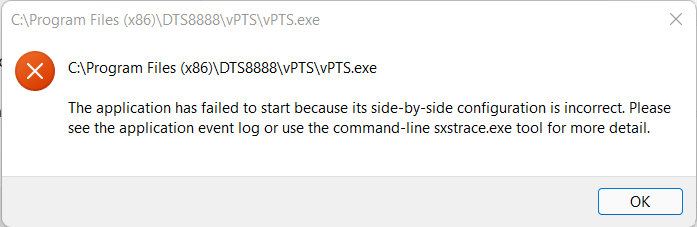
It is due to missing DLL files on your computer. The solution is to install a Microsoft redistribution package (Microsoft Visual C++ 2008 Redistributable Setup). You can download it at vcredist_x86.exe. Or you can download it directly from Microsoft at Redistributable Package.